



Errata: X3D for Web Authors
Front matter
- p. viii, Contents, Section 2.6 label: Field data types
- p. xix, Preface, Section 1 Goals: insert hyphen in Web-capable
- p. xxiii, Preface, Section 6 Chapter descriptions, bullet 4: remove space character in NavigationInfo
- p. xxv, Contributor list: add Aaron Bergstrom (North Dakota State University)
Chapter 1 - Technical Overview
- p. 3, Section 2.1, last paragraph, change beginning of last sentence to: Scene authors, software developers, industry professionals, and 3D enthusiasts
- p. 18, Section 2.6, section label: Field data types
- pp. 19-20, Table 1.4, X3D Field Types: an extended version of this table with additional advanced types can be found as part of the X3D Tooltips.
- p. 26, Table 1.5, header in last column: change to Xj3D open-source browser since Flux is no longer open source.
- p. 24, Section 2.8.1.2, fifth bullet, insert before last period: than the ClassicVRML and VRML97 syntax
- p. 24, Section 2.8.1.2, fifth bullet, append: The containerField attribute describes the default field name, used by this node's parent, to reference the node itself.
-
p. 33, Table 17, fix two typographical errors:
-
fix beginning and end of the
<!-- XML comment -->as follows:
<!-- Example scene to illustrate X3D tags and attributes. --> -
Remove embedded space, change
Image TexturetoImageTexture
-
fix beginning and end of the
-
pp. 57-58,
two corrected figure images:
Figure 2.11
is different than
Figure 2.12.
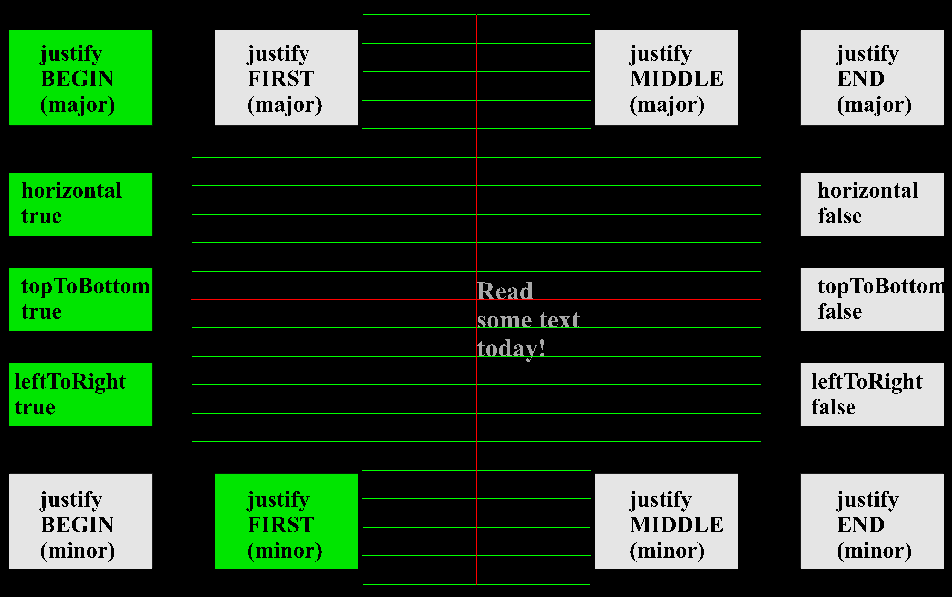
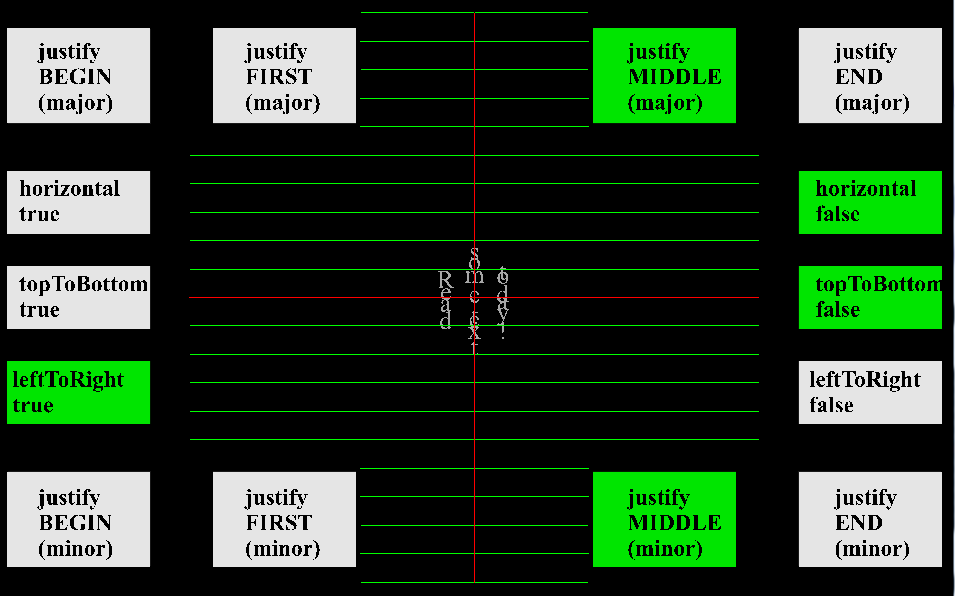
Both examples were generated using example ConformanceNist/Appearance/FontStyle/driver.x3d
Chapter 3 - Grouping Nodes
-
p. 68, Figure 3.1, replace image to show correct axis alignment:
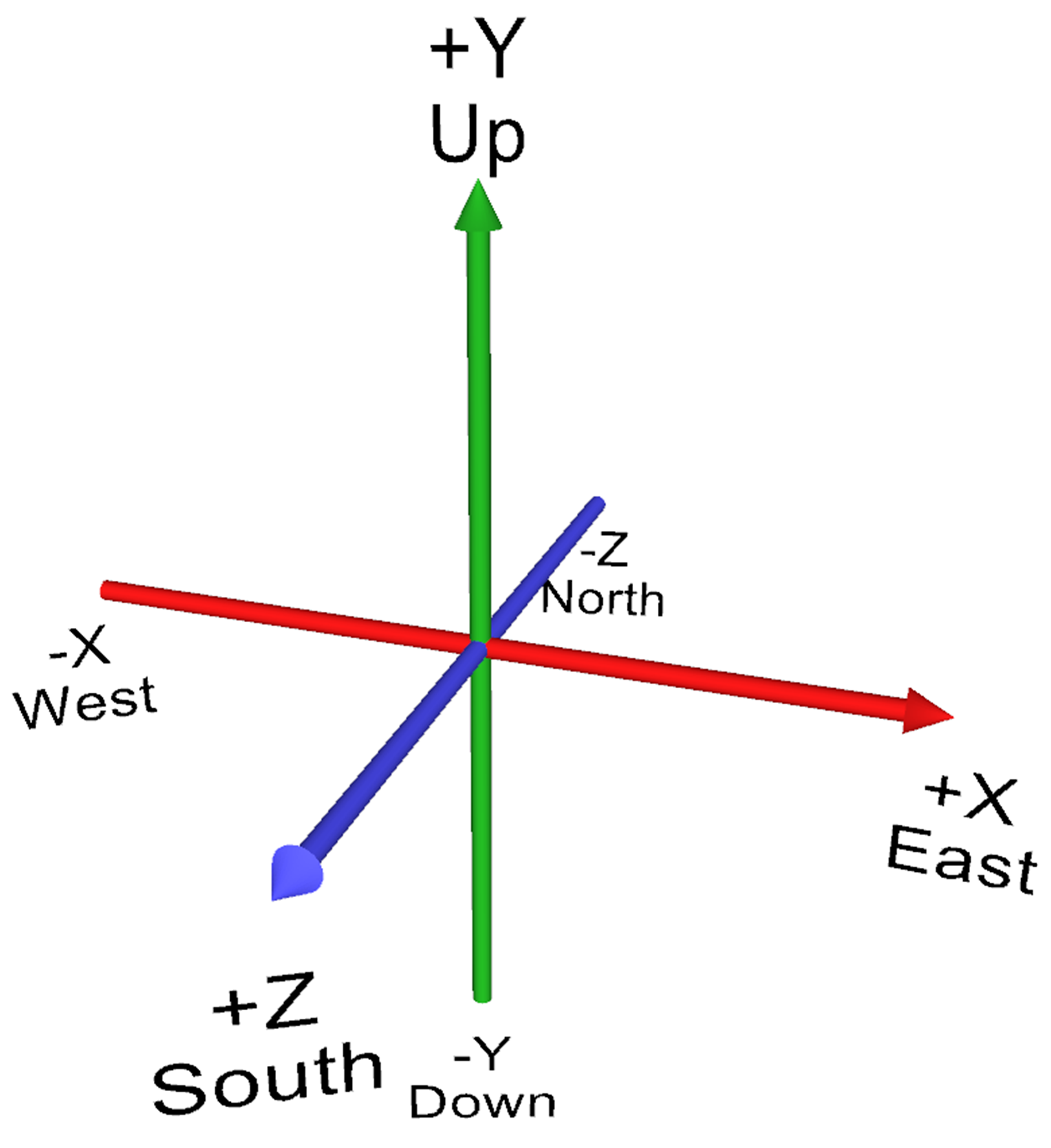
- p. 68, Figure 3.1, append sentence: The alignment of the +X axis with East and the +Y axis with South matches the coordinate system of the X3D Geospatial Component .
- p. 78, Section 3.2.2, last line, two occurrences: replace 0.707 with 0.78
-
p. 82, Hints and warnings, first line: replace with
The order of operation is first apply the center offset, then scaleOrientation and scale, then rotation, then restore the center offset, then translation. - p. 93, section 4.2, fourth line: proper spelling of frustum
Chapter 4 - Viewing Navigation
- p. 96, Section 2.1, fourth bullet, insert: for special interactive techniques
- p. 100, Binding-operations list, second bullet, t5: remove initial If
- p. 102, Table 4.2, sixth row: Viewpoint position default value is 0 0 10
- p. 105, section 3.1.5, third line: proper spelling of NavigationInfo
- p. 107, Table 4.4, fourth row: append quotation mark after "TELEPORT"
- p. 117, section 3.5, first sentence: remove second occurrence of the word object.
- p. 119, Figure 4.5 caption: proper spelling of geometry
Chapter 5 - Appearance Material Textures
- p. 121, Section 1, second paragraph: remove space character in TextureTransform
- p.138, Table 5.11, linetype pattern 5: change enumeration value from
(single)to(single arrow) -
p. 145, Table 5.18, last row, 4-component SFImage value: replace entry with
3 2 4, 0xFF0000FF 0x00FF00FF 0x0000FFFF 0xFF00007F 0x00FF007F 0x0000FF7F - p. 150, Figure 5.13: append
<TextureTransform rotation='0.78'/>to caption
Chapter 6 - Geometry Points Lines Polygons
- p. 157, chapter quotation credit: remove extraneous period (.) after 1846
Chapter 7 - Event Animation Interpolation
- p. 192, Section 2.5, bullet 3, correct caption by inserting italicized sentences at beginning and end of existing prose:
3. Check accessType and data type. Ensure that the target field has accessType inputOnly or inputOutput. Determine if the target field is a floating-point type: SFFloat, SFVec3f, MFVec3f, SFColor, and so on. The target field will either be a singleton SF type or an array MF type. In the X3D type-naming convention, SF means Single Field, and MF means Multiple Field. If so, use one of the Interpolator nodes.
- p. 192, Section 2.5, bullet 5, change caption: Determine which interpolator.
- p. 193, second bullet 3 at very bottom of page, change "SFOrientation" (which doesn't exist) to SFRotation.
- p. 194, Figure 7.5 diagram: change Step 7 TimeSensor initialization to loop='true'
- p. 195, bullet 4, append additional prose:
4. Determine whether Sequencer or Script. These special node types are not applicable to this example, because the data type for set_rotation is SFOrientation which is a floating-point type.
- p. 197, Table 7.4, fourth row: change SFL; to SF;
- p. 199, Table 7.5, fifth row: change ColorInterpolator to OrientationInterpolator
- p. 201, Table 7.6, eighth row for TimeSensor outputOnly fraction_changed event: change SFTime to SFFloat.
Chapter 8 - User Interactivity Nodes
- p. 221, Section 1, paragraph 3, insert: The Collision node reports when a viewer collides with shape geometry. Anchor and Collision are covered in Chapter 4, Viewing and Navigation.
- p. 229, first full paragraph, first sentence, append period after can be used instead.
- p. 238, Section 3.3.4, append to section title: offset and autoOffset
-
p. 245, Table 8.17, Node Syntax for StringSensor, insert line entry:
SFBool inputOutput enabled true Interactive - p. 247, Section 4.2, Related Nodes and Concepts, append:
Chapter 4, Viewing and Navigation describes several nodes which support user interaction. Anchor uses the pointing device to provide a description, viewpoint link, browser page or another X3D scene. Billboard rotates child geometry to face the user, and Collision reports if the viewer collides with other geometry.
Chapter 12, Environment Sensor and Sound Nodes also includes several user-interaction nodes. LoadSensor reports when a media asset is loaded. ProximitySensor reports when a user is in the vicinity of a given location. VisibilitySensor indicates when the user's current camera view has a clear sight line to sensed geometry.
Chapter 9 - Event Utilities and Scripting
- p. 249, Section 1, insert new paragraph 2: This chapter covers the Event Utility nodes: BooleanFilter, BooleanSequencer, BooleanToggle, BooleanTrigger, IntegerSequencer, IntegerTrigger, and TimeTrigger. The Script node is also presented in detail.
- p. 260, Section 3.5, first paragraph, change: step-function to impulse-function
Chapter 10 - Geometry 2D
-
p. 280, Section 2.1, insert new third paragraph:
Because Geometry2D nodes are defined by default in the vertical X-Y plane, this means that no Z values need to be defined. Node definitions are thus somewhat terser than their counterpart 3D nodes.
-
p. 280, Section 2.2, append paragraph:
Most fields in Geometry2D nodes have accessType='initializeOnly', meaning that they cannot be modified directly after creation. Some animation effects can be accomplished by modifying translation, rotation or scale in a parent Transform node.
-
p. 280, Table 10.1 bottom section, change
#X3D V3.0 vtf8to
#X3D V3.0 utf8 - p. 284, Section 3.2.2., proper spelling of endAngle
-
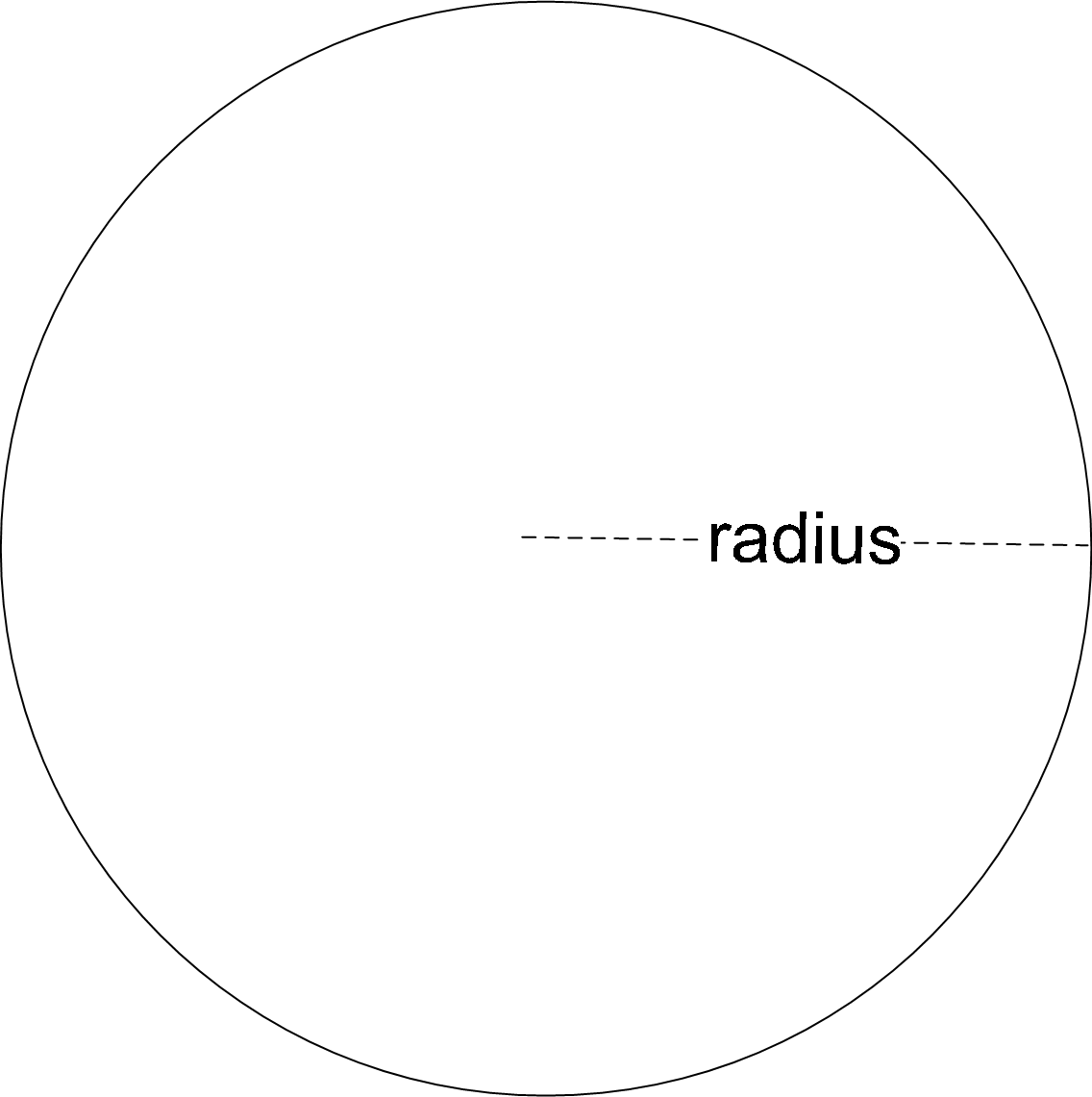
p. 285, Figure 10.5 is erroneous, the notched inner circle needs to be removed. Corrected version:
Chapter 11 - Lighting and Environment
-
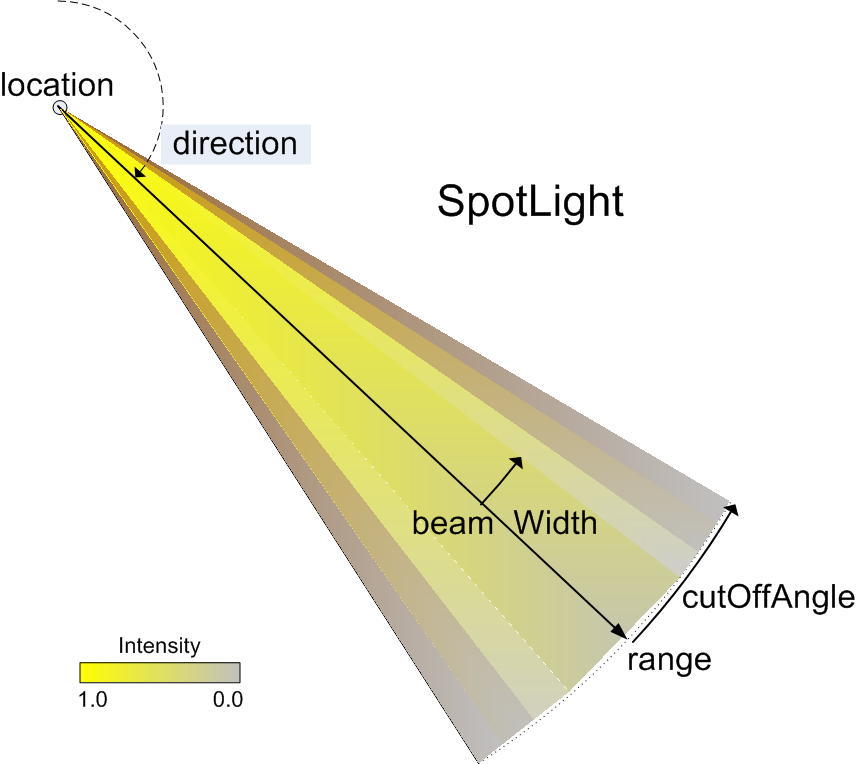
p. 316, Figure 11.7: defined angles for beamWidth and cutOffAngle need to be swapped. Corrected version:
- p. 320, Figure 11.9 caption: change "seamless panorama" to "background panorama"
- p. 322, second line: remove stray space character from "allows"
Chapter 12 - Environment Sensor Sound
- p. 327, chapter quotation credit: remove extraneous period (.) after 1667
-
p. 334, Section 3.1.6 Hints and warnings, append paragraph:
LoadSensor functionality can also be included in prototype design by embedding a LoadSensor node, providing it with watchList children that includes the local X3DUrlObject nodes of interest, and then exposing the appropriate LoadSensor fields as ProtoDeclare fields using IS/connect links. Prototypes are described further in Chapter 14, Creating Prototype Nodes. - p. 342, Figure 12.3 caption: append sentence "Note that leftPanFactor + rightPanFactor always equals 1."
- p. 347, Section 3.4.9 Hints and warnings: reverse relation operators to read minFront ≤ maxFront and minBack ≤ maxBack
Chapter 13 - Geometry Triangles Quadrilaterals
-
p. 361, Table 3.7, corrected values for Normal vectors
to instead have unit length:
vector="0 1 0, 0 0 1"and
vector [0 1 0, 0 0 1] - p. 362, equations at top of page: replace Coordinate point P and P' with Normal vector N and N'
- p. 370, Section 3.5.1, append new hint: QuadSet does not include the convex field.
- p. 375, Section 3.7.1, append new hint: Any convex polygon may be triangulated (i.e. tesselated) into a single fan by selecting one vertex as the fan center.
- p. 377, Section 3.9.1, append new hint: IndexedQuadSet does not include the convex field.
Chapter 14 - Prototypes
- p. 386 Table 14.2, and p. 389 Table 14.4: prototype name is a required attribute, e.g. <ProtoDeclare name="NewNode">
Appendix B - Help: X3D/VRML Examples
-
This appendix continues to be maintained online and is now called
X3D Resources
at
http://www.web3d.org/x3d/content/examples/X3dResources.html
Appendix C - X3D Scene Authoring Hints
-
This appendix continues to be maintained online
at
http://www.web3d.org/x3d/content/examples/X3dSceneAuthoringHints.html
Index
- p. 427, second column bottom, add: containerField attribute, pages 24 and 26
- p. 429, first column top, add: event fan in and fan out, pages 192, 190
- p. 429, first column bottom, add: fan in for event routing, page 192
- p. 429, first column bottom, add: fan out for event routing, page 190
- p. 437, second column center, add: solid field, pages 40-41
- p. 438 and 441, add: X3D Tooltips, pages 407
Colophon
TODO. A colophon section is needed.
Uniform Resource Locator (URL) for this page is
http://x3dgraphics.com/errata.php
Revised 5 September 2012.
Portions of this work are from the book,
X3D: 3D Graphics for Web Authors, by
Don Brutzman and Leonard Daly, published by Morgan Kaufmann Publishers,
Copyright 2007 Elsevier, Inc. All rights reserved.
Web site copyright © 2008-2017, Daly Realism and Don Brutzman